Know where every working hour goes, without the spreadsheets
WorkHour gives your employees a simple punch-in clock and a daily work log, and gives you live attendance, accurate hours and clean reports for every team member.
- Punch in and out
- 1 click
- Shift and break timer
- Live
- Report exports
- Excel + PDF
04:37:12
Net working time
This month
142h 30m
Breaks today
0h 42m
- Client onboarding call1:000:50
- Fix invoice export bug2:002:15
- Sprint planning notes0:450:40
Made for teams that bill, plan or pay by the hour
- IT services
- Agencies
- BPO & support
- Consulting
- Field teams
- Startups
Everything you need to track time properly
One portal for the organization, one for every employee. No installs, works on any phone or laptop.
Punch in, break, punch out
Employees start their shift with one click. Breaks pause the clock, and net hours are worked out automatically.
Start and end times per task
Give a task a start and an end time and the actual time is calculated for you — no mental maths, no rounding.
Screenshots on every task
Attach screenshots to a work entry. Admins view them full screen and both sides can mark them up with a highlighter.
Random screen monitoring
Capture an employee’s screen at random moments during their shift and review every capture in the admin portal. Switch it on per organization.
Leave and holiday calendar
Employees apply for leave from their portal, admins approve or reject it, and holidays show on everyone’s calendar.
Built-in team chat
One-to-one and group chat between employees, admins and the platform team. Realtime, with unread counts.
Daily work log
Log several tasks a day with estimated and actual time, just like a timesheet, but with totals done for you.
Locked once submitted
Past entries cannot be edited by employees or managers, so your records stay trustworthy.
Day, week and month reports
See hours per person or per team for any date range, with estimated versus actual time side by side.
Excel and PDF exports
Download attendance, timesheets and summaries for payroll, billing or audits in a couple of clicks.
A shift clock your team will actually use
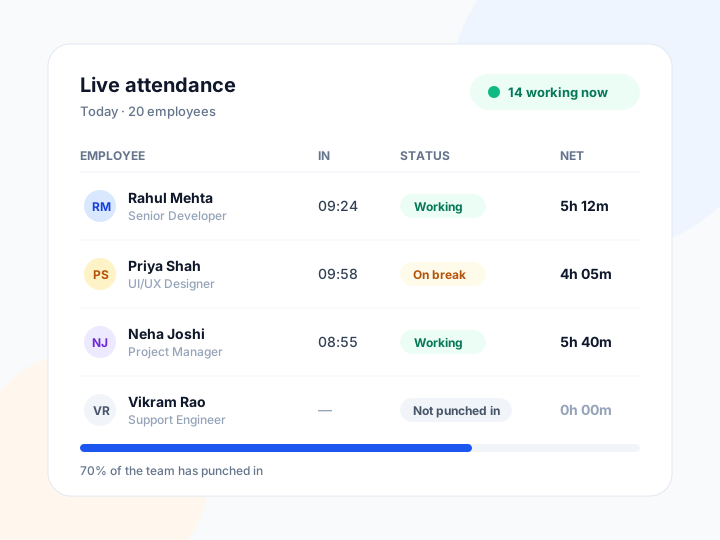
Every punch is recorded with the server time, not the device clock, so the hours you see are the hours that were worked. Late starts are flagged against each employee’s shift start time.
- Live timer for the current shift, breaks and net working time
- See who is working, on a break or not punched in right now
- Multiple breaks per shift, with limits you set
- Forgotten punch-outs are flagged for review
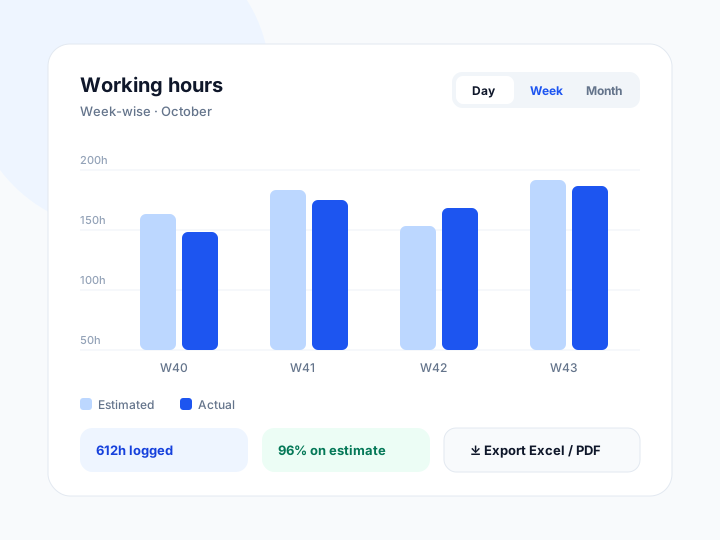
Working hours, summed up the way you need them
Group hours by day, week or month for one employee or the whole team. Compare estimated time with actual time to spot tasks that run over before they become a habit.
- Daily, weekly, monthly and custom date ranges
- Search and filter by employee, task or date
- Exports keep your current filters
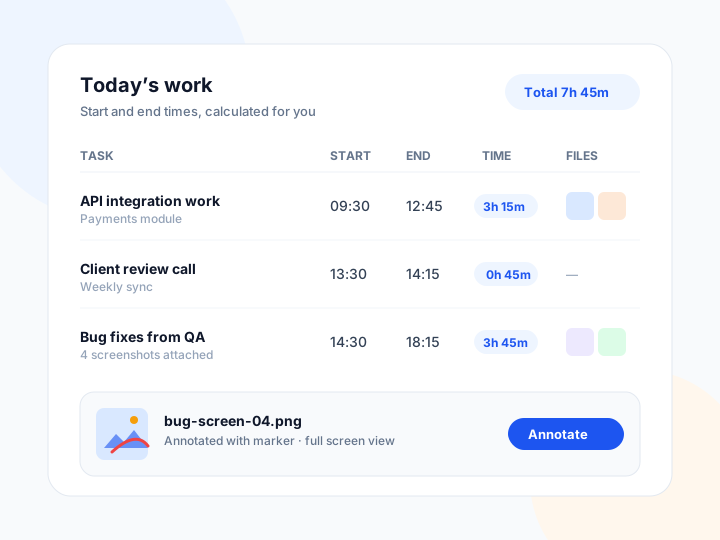
Start time, end time — the maths is done for you
Each task in the daily work log can carry a start and an end time, and WorkHour calculates the actual time worked. Employees can attach screenshots as proof of work; admins open them full screen and both sides can draw on them with a marker to point at exactly the right pixel.
- Actual time calculated from start and end, even past midnight
- Up to 10 screenshots per task, stored securely in the cloud
- Full-screen viewer with highlighter annotations on both sides
- Originals are never overwritten — annotated copies saved alongside
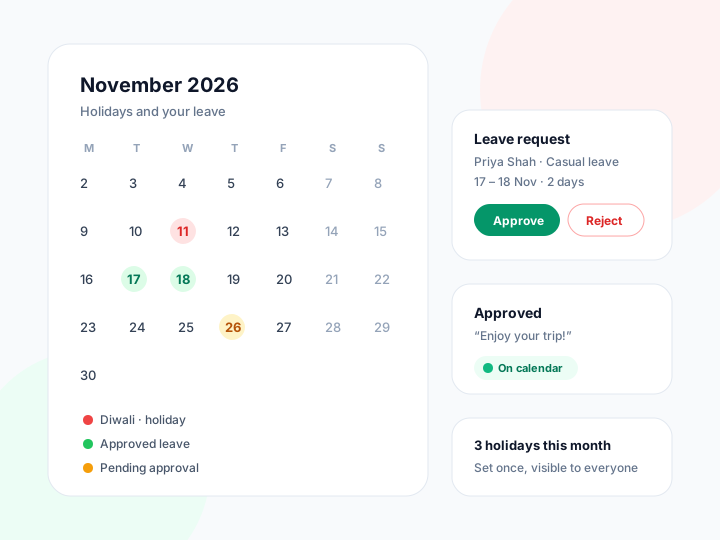
Leave requests without the paperwork
Employees apply for casual, sick, earned or unpaid leave straight from their portal. Admins approve or reject with a note, and the decision lands back on the employee’s calendar — next to the holidays you set once for the whole organization.
- Apply, track and cancel leave requests from the employee portal
- Approve or reject with an optional note; every decision is logged
- Organization-wide holiday calendar visible to every employee
- Overlapping requests are caught automatically
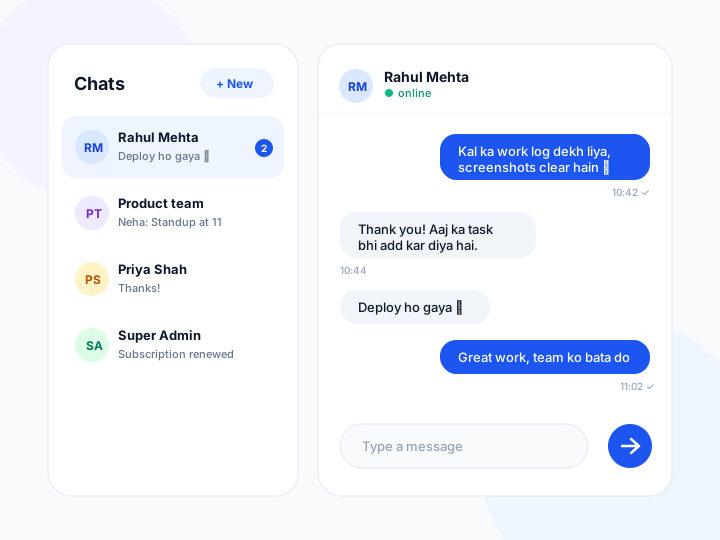
Talk it through without leaving WorkHour
A WhatsApp-style chat connects employees, organization admins and the platform team. Start a one-to-one conversation or a group for a project, and messages arrive in realtime with unread counts — no more copying work questions into a personal messaging app.
- One-to-one and group conversations
- Realtime delivery with unread badges
- Private to your organization, plus a line to platform support
Separate, secure workspaces for every organization
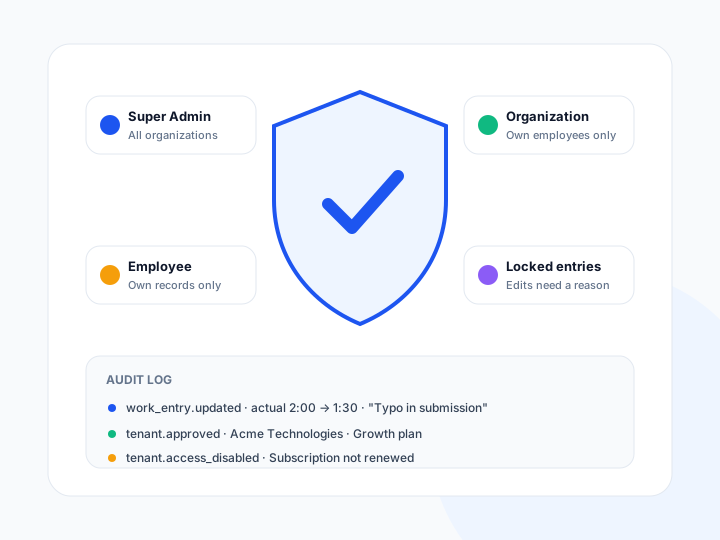
Roles decide what each person can see and do. Organization admins manage their own employees, employees see only their own data, and every sensitive change is written to an audit log.
- Role-based access for admins, organizations and employees
- Encrypted passwords and secure sessions
- Audit trail with the old value, new value and reason
Less admin, cleaner records
- 5 min
- to add your first employee
- 0
- spreadsheets to merge at month end
- 24/7
- access from any device
- 100%
- of hours calculated on the server
Simple plans that grow with your team
Every plan includes the employee portal, attendance, work logs and exports.
Starter
For small teams getting started with time tracking.
₹999/month
Up to 15 employees
- Up to 15 employees
- Punch in/out with breaks
- Daily work log
- Excel & PDF exports
- Email support
Growth
For teams that need reports and closer oversight.
₹2,499/month
Up to 50 employees
- Up to 50 employees
- Everything in Starter
- Weekly & monthly reports
- Late arrival tracking
- Priority email support
Business
For larger organizations with several departments.
₹5,999/month
Up to 200 employees
- Up to 200 employees
- Everything in Growth
- Custom break and entry rules
- Onboarding call
- Phone & email support
Prices exclude GST. Need more than 200 employees or a custom setup? Contact us.
Built for HR, managers and employees alike
Everyone gets the view they need, and nobody has to chase anyone for a timesheet.
For HR teams
Attendance and hours are ready for payroll at month end, with exports that match your filters.
For managers
See planned versus actual time per task and spot overloaded team members early.
For employees
A clear view of their own hours, breaks and work, with nothing to calculate by hand.
For owners
Accurate records you can rely on for billing clients and planning headcount.
Teams that moved their timesheets to WorkHour
Month-end used to mean chasing twenty spreadsheets. Now the hours are already there when payroll needs them.
HR Manager
Sample review, IT services company
The estimated versus actual column changed how we plan. We finally see which tasks always take longer.
Delivery Lead
Sample review, Digital agency
Punch in, log the work, done. Our team picked it up on the first day without any training.
Operations Head
Sample review, Support centre
Questions we hear often
Can’t find what you are looking for? Send us a message below.
Who can register on the website?+
Only organizations register on the website. After we approve your registration, you add your employees from the organization portal and they receive their login details by email.
Can employees change their old entries?+
No. Employees can edit today’s draft entries until they submit them. Once submitted, or once the day is over, entries are locked. Only the platform administrator can correct a locked entry, and every correction is logged with a reason.
How are working hours calculated?+
Net working hours are the time between punch-in and punch-out minus all breaks. All times come from the server clock, so changing the time on a phone has no effect.
Can I export reports?+
Yes. Attendance, work logs, employee lists and summaries can be downloaded as Excel or PDF, using whatever filters you have applied.
How does leave management work?+
Employees apply for leave from their portal with a type, dates and a reason. The organization admin approves or rejects the request, optionally with a note, and approved leave appears on the employee’s calendar together with the organization’s holidays.
Can employees attach proof of work?+
Yes. A work entry can carry up to 10 screenshots. Admins can open them full screen, and both the employee and the admin can draw on an image with a marker — the original screenshot is always kept unchanged.
Is there a built-in chat?+
Yes. Employees, organization admins and the platform team can message each other one-to-one or in groups, in realtime. Chat is private to your organization; other organizations can never see your conversations.
Does it work on mobile?+
Yes. WorkHour runs in any modern browser on phones, tablets and computers. There is nothing to install.
What happens when a subscription ends?+
Your data stays safe. Sign-in for the organization is paused until the subscription is renewed.
Ready to stop chasing timesheets?
Register your organization today. Once approved, you can add employees and start tracking hours the same day.
Let’s talk about your team
Tell us a little about your organization and we will get back to you within one working day.
- info@jmstech.me
- Indore, MP 453441
- Monday to Saturday, 10:00 to 19:00 IST